Workshop Plus
WORKSHOPS 2026
- Latest posts:
- Teri Wk8
Teri (Online Beginner)
WEEK 8 EXERCISE 1
Wow!!! What a challenge !!! I can see why you set this task. Multiple finishes and multiple techniques. It was difficult but enjoyable.
Well, it was intended to be challenging rather than intimidating. However, if it stretched you, that's fine. And if you got halfway to where you'd like to be, that's fine too. What you learned from this you'll take forward to your next drawing and, before you know it, you'll be drawing what you see in your mind, or at least be close to it. The mind is a strange animal - well, mine is
 - it can see things that aren't realistically feasible (like seeing something from two angles at once) but you soon learn to accept that the drawing will never be quite the way you imagined it, but the result will still be good.
I'll tackle this from the background forwards...
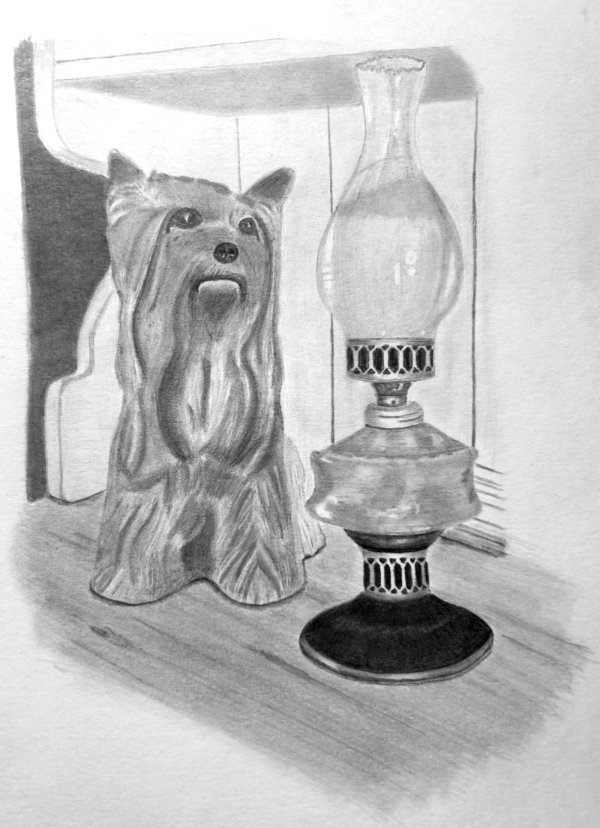
I like the treatment of the dresser, although you've relied a lot on outline. Try to use adjacent values to tell us where an edge is. A line should not be necessary. The dark extreme background is interesting and does its job much better than anything detailed might.
The curves of the side are well described but, again, they definitely do not need to be outlined. The rest of the dresser is nicely suggested without it dominating the scene, although the moulding behind the lamp is, again, just line and has no three-dimensional form. And the underside of the shelf has very soft edges, which suggests it's somehow flowing into them, rather than those edges being sharp changes in angle.
You've chosen to partially flatten Kitty by taking a more general view of her three-dimensionality. That's your vision and quite acceptable, but not in comparison to the lamp.
The "hairy" lines describing the ceramic locks of hair work quite well. The face and head are well drawn, but you probably should have modified the painted and quite unnatural triangular highlights in the eyes. The dark eyes and nose work well to draw attention to Kitty - although they are pale in comparison to the lamp's base. And, finally, the patch of shade beneath her chin helps to push the lower jaw forwards and emphasise her mouth.
You've not established any cast shadows, which is a pity. You have a contact shadow on the dresser's top around Kitty's feet, but no other shadows anywhere else. Cast shadows would have helped to tie the Kitty, the Lamp, and the setting together. Remember, this is a composite photo, so you need to work to make everything live together.
The lamp itself looks good. The ellipses are accurate, and that's something a lot of artists on this course get wrong. Even the brass collar below the chimney is correct and not flat. The horizon runs through that collar, so you'd expect the ellipses to be very shallow - and yours are. But, again, many get that wrong. The lower ellipse dips down and the upper one curves upwards - only slightly, but enough to help us understand the collar is a rounded form. However, although the collar has its central highlight, the recession of the punched holes is not correct. They are almost the same width from one side to the other, but should narrow as they go around the curve. So, what the highlight suggests is a rounded form, the lack of recession gives the impression of the collar being a flat plate, which causes confusion.
You've made a good distinction between the brass and glass surfaces except, in my opinion, for the base. I think you could have used some artistic licence and lightened it to be closer in tone to the brass above. But you have suggested its satin sheen so it contrasts with the shiny glass.
The shading of the reservoir works well. The sharp-edged, bright highlights are essentially what you'd expect to see, so they alone almost send the "this is glass" message. What is a little confusing is your shading and choice of grades. The viewer expects glass to be transparent, hard, shiny and, above all, smooth and reflective. Hard grades produce much smoother shading than soft ones, but your shading looks grainy. By all means use a 2B or similar to establish the darker tones, but subsequent layering with HB and 2H to complete the reservoir would have smoothed and burnished the softer 2B. The overall result would be a much smoother and more glass-like surface.
In contrast, I think the chimney works very well. Its lack of grain, hard-edge reflections, and absence of visible lines shout "glass". You've correctly used thick outline for the sides, as we are looking through a thickness of glass at that point. The same partially applies to the crinkled top, but not as completely as you've drawn it. That top will pick up highlights on the side facing the light and will appear dark on the other side due to the thickness of the glass. And the rear of that top circle should have been lighter than the front, as it's being viewed through coloured glass. It almost works for you, yet it's not at all obvious which half is facing us and which is behind.
A thought just occurred to me - you could have invented a vertical highlight on the front surface that cut through the rear of the rim. You've almost done that, but if part of the rim had been obscured by the highlight I think that would have made it clearly obvious which edge was the forward one - and sometimes "clearly obvious" is what works best.
Overall, I think Kitty is suffering from being too light and lacks the punch that darker tones and brighter highlights would have produced. But you've done a very creditable job.
I thoroughly enjoyed working with you, Teri, and look forward to working with you again in the future.
Workshops UK
Tutorials
by Mike Sibley